Christmas is supposed to be warm, noisy, and full of people you love. But when someone in the family has passed away, that empty spot on the sofa or around the dinner table can feel even bigger than usual.
That’s why many families choose to create a Christmas memorial photo – a Christmas family picture where a deceased loved one is gently added back into the scene. Not as something creepy or dramatic, but as a quiet reminder.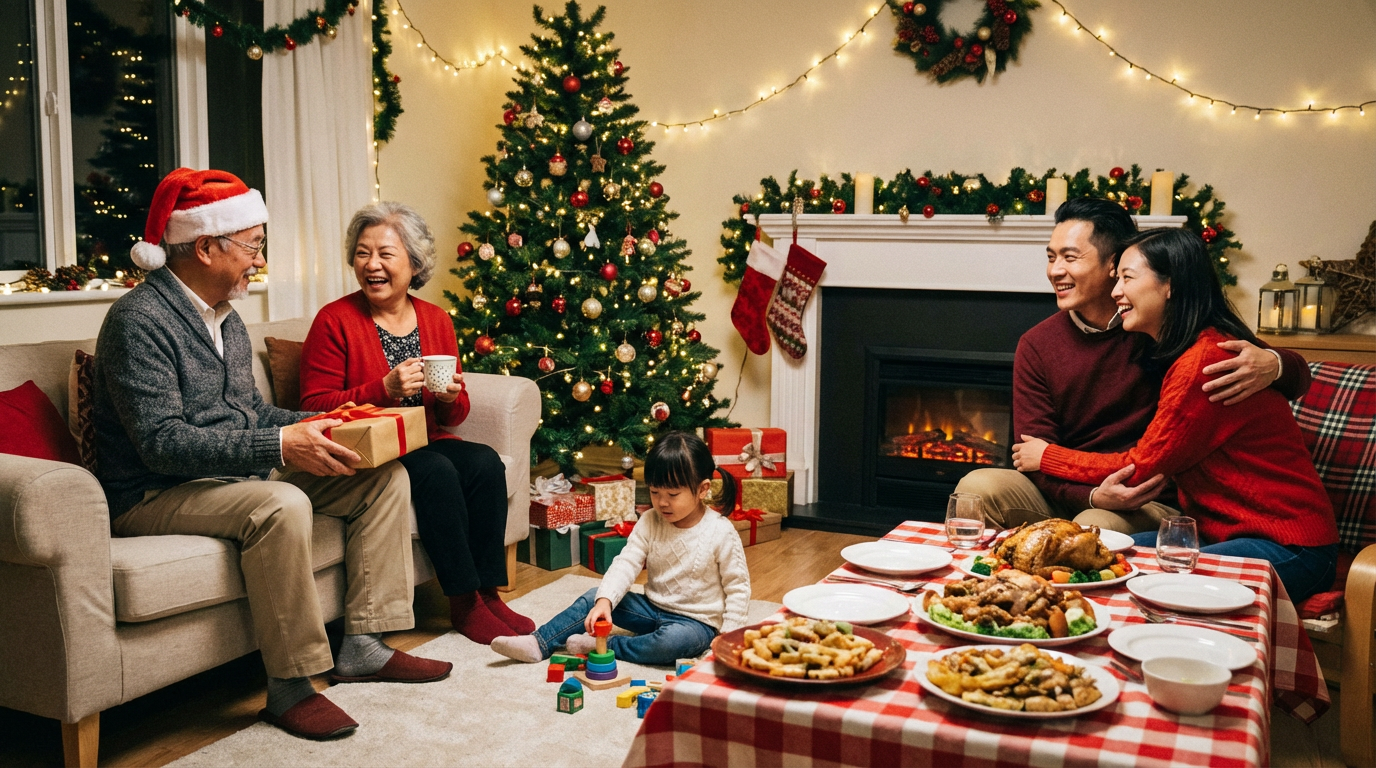
“You are still part of this family. We still remember you.”
Maybe it’s a grandparent who always sat in the same armchair by the tree. Maybe it’s a parent who never missed Christmas dinner. Maybe it’s a child, sibling, or close friend who used to laugh the loudest in every photo.
In this guide, we’ll walk through:
- What a Christmas memorial photo is (and what it isn’t)
- How to decide if it feels right for your family
- How to choose the best photos so the result looks natural
- Gentle, respectful Christmas memorial photo ideas
- A simple way to create this kind of photo without Photoshop
The goal is not to make a perfect or heavily edited image.
The goal is to create something that feels warm, comforting, and meaningful for you and your family.
What Is a Christmas Memorial Photo?
A Christmas memorial photo is a Christmas-themed picture where a loved one who has passed away is added into the scene in a gentle, natural-looking way.
It might be:
- A family sitting together on the sofa by the Christmas tree, with a late grandparent quietly added back into their usual spot
- Parents and kids gathered around the fireplace, with a deceased loved one standing or sitting near them, smiling naturally
- A big family group photo where a missing parent, sibling, or child is blended in, as if they were able to be there for one more Christmas
The key idea is comfort, not shock.
A good Christmas memorial photo should:
- Look like the loved one is really there in the room
- Match the lighting, angle, and style of the rest of the picture
- Feel peaceful and loving – not spooky, over-edited, or exaggerated
For some families, this photo becomes:
- A way to include the person in new traditions, even if they are no longer physically present
- A picture they frame and bring out every Christmas
- A way to help children understand that “Grandma is not here, but we still remember her and talk about her”
This kind of image is sometimes called a “heaven photo” or “in loving memory photo”, but most families don’t think of it as something supernatural.
They simply see it as a quiet way to keep someone they miss in the family picture.
Is It Okay to Add a Deceased Loved One to a Christmas Photo?
If you are thinking about making a Christmas memorial photo, you might also feel unsure:
- “Is this disrespectful?”
- “Will it upset other family members?”
- “Will the result look creepy?”
These questions are very normal.
The truth is: many families around the world already do this in different ways.
Some commission painted portraits that combine multiple old pictures. Others ask a designer to blend their loved one into a new photo. Today, AI tools make this process easier and more accessible.
Whether it’s “okay” or not really depends on:
- Your intention – Are you doing this out of love, respect, and longing?
- The style of the photo – Does it look natural and gentle, or overdone and strange?
- Your family’s feelings – Are most people comfortable with the idea, or do some need more time?
A few simple guidelines can help:
- If this loved one enjoyed being in family photos, it often feels very fitting to include them in a Christmas picture.
- If you have very sensitive family members, it can help to talk to them first:
- “I was thinking about making a Christmas photo with Dad in it, just as if he was sitting on the sofa with us. Would that feel comforting to you, or too hard right now?”
- Start with a soft, natural style – no ghost effects, no glowing outlines, no heavy filters. Just a warm, realistic photo where they look present and at peace.
When done with care, a Christmas memorial photo can be:
- A way to say: “You’re not forgotten.”
- A gentle bridge between memory and the present
- Something that brings tears at first, and then quiet comfort over time
If, after reading this, you still feel that it might be too intense for your family this year, that’s okay too. Grief has no fixed timeline. You can always come back to this idea in a future Christmas when it feels right.
How to Choose the Right Photos (So the Result Looks Natural)
A natural-looking Christmas memorial photo starts with the right source photos. Good input makes a big difference in the final result.
1. Choose a Warm, Comfortable Christmas Family Photo
This will be your main background photo – the picture you’ll add your loved one into.
Look for a photo where:
- The family is relaxed, not overly stiff or posed
- The lighting is soft and warm (typical indoor Christmas lighting)
- There’s some empty space on the sofa, chair, or floor where your loved one could naturally “fit in”
- Everyone’s faces are clearly visible
If you have several options, pick the one that feels most like “real life” – the one that looks like your family just being themselves.
2. Pick a Clear, Natural Photo of Your Loved One
Next, choose a good photo of the person you want to add.
Try to find a photo where:
- Their face is clear and not heavily shadowed
- They are sitting or standing in a relaxed, natural pose
- They are smiling softly or have a calm expression that matches the mood you want
- The photo quality is reasonably high (not too blurry or pixelated)
Avoid photos with:
- Strong, colored filters
- Extremely bright or dark lighting
- Strange angles (like from far below or from the top) unless it matches the family photo
3. Match Lighting and Angle When Possible
The more similar the lighting and angle between the two photos, the more natural your final Christmas memorial photo will look.
- If your Christmas family photo is taken indoors with warm, yellowish lights, try to choose a photo of your loved one in similar light.
- If the family is mostly facing the camera straight-on, a photo where your loved one is also facing forward will blend better than one in profile.
It doesn’t have to be perfect – modern AI tools can adjust a lot – but even a rough match helps.
4. Think About Where They Would Naturally Be
Before you generate or edit anything, pause and imagine:
- “If they were really here this Christmas, where would they sit or stand?”
- On the sofa next to a certain grandchild?
- Standing beside the tree?
- Sitting in “their” chair near the fireplace?
Having this in mind will help you choose a good position, size, and pose later on, so the final image feels like a moment that could have really happened.
Gentle Christmas Memorial Photo Ideas for Your Family
If you’re not sure what kind of Christmas memorial photo you want, here are some gentle ideas to inspire you.
1. Grandma on the Sofa Next to Her Grandchildren
Imagine your normal Christmas family photo: kids on the sofa, parents nearby, the tree in the background.
In this version, Grandma is added back into “her usual spot” on the sofa – maybe with one grandchild leaning slightly toward her, or with her hands folded calmly in her lap.
This kind of Christmas memorial photo feels cozy and familiar, as if she simply joined the family for one more Christmas evening.
2. Dad Sitting by the Christmas Tree With the Gifts
In many families, one person used to be “in charge of the presents”.
You can create a photo where your dad is gently added sitting or kneeling by the Christmas tree, near the gifts. His posture can be relaxed, looking toward the family, as if he’s just about to hand someone a present.
It’s a subtle way to say: “You’re still part of this tradition.”
3. Mom Standing Behind the Dinner Table
If your family Christmas centers around a meal, you might choose a photo of everyone gathered around the table.
In your Christmas memorial photo, Mom is standing or sitting at the end of the table, with a soft smile, as if she just joined the conversation. This works especially well if you have a clear memory of her always “hosting” or serving food.
4. A Pet Memorial Photo Near the Fireplace
For many families, pets are family members too.
You can create a Christmas pet memorial photo where your dog or cat is added lying near the fireplace, sitting by the tree, or curled up on their favorite spot on the rug.
This can be a very comforting way to remember a pet who crossed the rainbow bridge, especially for children.
5. A “Photo Within a Photo” on the Mantel
If some family members are not ready to see a full body image of the deceased person in the room, a gentler option is:
- Use a photo of the family living room at Christmas
- Add a framed portrait of your loved one on the mantelpiece, shelf, or side table
This way, they are still very present in the Christmas scene, but in a softer, more symbolic way.
Step-by-Step: How to Add a Deceased Loved One to a Christmas Family Photo (Without Photoshop)
You don’t need to be a designer or learn complicated software to create a meaningful Christmas memorial photo. Modern AI tools can do most of the technical work for you.
Here’s a simple step-by-step process using an online editor like Add Loved One to Photo:
Step 1 – Upload Your Christmas Family Photo
Start by uploading the main photo you want to use:
- A Christmas family picture by the tree
- A cozy living room scene with everyone on the sofa
- A group around the dinner table
Choose the one that feels most “right” for this year.
Step 2 – Upload a Photo of Your Deceased Loved One
Next, upload a clear photo of the person you’d like to add.
Remember the tips from earlier:
- Choose a natural expression and relaxed pose
- Avoid heavy filters and strong shadows if possible
- Use the highest resolution version you have
Step 3 – Let the AI Cut Out and Blend Them In
The tool will:
- Automatically cut out your loved one from their original background
- Blend them into the Christmas family photo
- Adjust things like size, lighting, and shadows so they match the scene
Here you can usually choose:
- Rough position (sofa, chair, near the tree, etc.)
- Whether they sit or stand
- Overall mood: very subtle, clearly visible, or gently in the background
Focus on what feels natural and comforting for you.
Step 4 – Adjust Position, Size, and Details
Take a moment to look at the result and ask yourself:
- Do they look like they’re really in the room?
- Are they too large or too small compared to everyone else?
- Does their facial expression match the mood of the photo?
You can then:
- Move them slightly closer to or further from the family
- Make them a little smaller to feel more humble and gentle
- Avoid odd placements (like floating too close to the camera or blocking someone’s face)
Small adjustments can make the Christmas memorial photo feel much more believable.
Step 5 – Download and Share Thoughtfully
Once you’re happy with the result:
- Download the final Christmas memorial photo
- Consider sharing it first with close family members in a private chat or group
- Ask: “How does this make you feel?” and give people space to react
Some might cry. Some might smile. Some might need more time.
You don’t have to post it publicly right away.
This photo is first and foremost for you and your family.
Tips to Keep Your Christmas Memorial Photo Gentle, Not Creepy
A few small choices can help your Christmas memorial photo feel warm and respectful instead of strange.
Do:
- Keep the style consistent with the rest of the photo
- Use natural skin tones and lighting
- Place your loved one somewhere they might really have been in life
- Let their expression be calm, peaceful, or softly smiling
- Ask one or two trusted family members for feedback
Avoid:
- Ghost-like transparency or glowing blue effects
- Heavy halos, neon light, or dramatic filters
- Making them larger than everyone else in the scene
- Posing them in an exaggerated or “staged” way they would never have chosen
- Adding them into a chaotic or silly photo if you’re aiming for a soft, in-loving-memory feeling
If you’re ever unsure, a simple rule is:
“Would I feel comfortable framing this and putting it in my living room?”
If the answer is yes, you’re probably on the right track.
Final Thoughts: A Quiet Way to Keep Them in the Family Picture
Grief doesn’t go away just because another year has passed.
Christmas, with all its lights and songs and traditions, often makes us feel the absence of a loved one even more strongly.
A Christmas memorial photo is not about pretending they are still alive.
It’s about saying:
“You were here. You mattered. You still matter to us.”
For some families, creating this kind of image becomes a new tradition:
every year, a new Christmas family photo where the person they miss still has a place on the sofa, by the tree, or at the table.
If you’d like to create a gentle, natural-looking Christmas memorial photo, you can try an online editor like Add Loved One to Photo:
- No Photoshop or advanced skills needed
- Just upload your Christmas family photo and a picture of your loved one
- Let the AI help you bring them quietly back into the family picture
Whether you decide to make one this year or simply keep the idea in your heart for later, we hope this guide gave you some clarity, comfort, and inspiration for honoring someone you love this Christmas. 🎄❤️